Jillian Manges

Case Study · Workflow Optimization

Redesigning the Creative Request Experience

Role

Team Lead, Digital Design

TEAM INVOLVED

Customer Success Managers, Digital Designers, Salesforce Admins

Timeline

4 months (initial launch)

Tools

Salesforce, Google Sheets, Google Forms 

01

The Challenge

As Sojern's creative services grew, so did the friction in how work got requested. Customer Success Managers submitted creative requests through Salesforce, and Designers relied on those cases for everything from requirements to final delivery. Over time, the process had also sprawled across 2 systems: Salesforce for individual requests and a Google Sheet for bulk work.

A long, confusing form

Cases often came to the design team missing information, links, or assets which lead to rounds of back-and-forth, which ultimately caused delays with launching campaigns.

Painful bulk requests

Since 2018, multi-property campaigns had run through a separate Google Sheet. Access was inconsistent across teams, CSMs had to submit multiple cases, and I had to manually add bulk work to otherwise automated reporting.

Too many case types and statuses

Cases came in as too many different types, and each round of revisions had its own status (Revision 1, 2, 3, and more). The dropdown became a long, cluttered list, so the right status was hard to find, and cases often weren’t updated correctly.

Guesswork and digging

CSMs had to figure out due dates on their own, and preview links for customer designs were buried in Chatter comments.

BEFORE
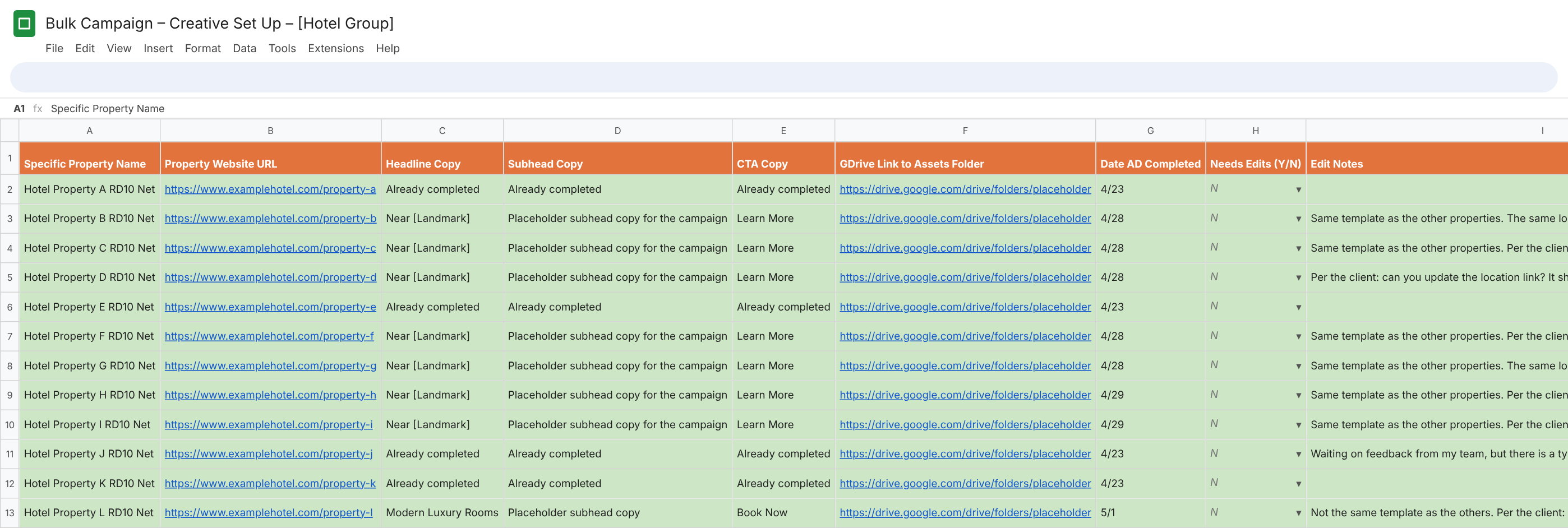
Each multi-property campaign lived in its own Google Sheet outside Salesforce. Copy, links, completion dates, and edit notes were all tracked by hand, row by row.
A bulk campaign tracked in a separate Google Sheet, one row per property

02

Approach

Stakeholder interviews

Talked with CSMs and Designers globally about what felt repetitive or unclear.

Workflow audit

Mapped every step from first request to download to find where the bottlenecks were

Salesforce analysis

Identified what already worked well and simplified around it.

QA and enablement

Partnered with the Salesforce team on the build, tested the new process end to end before launch, then helped create the updated instructions, training deck, video walkthrough, and hub page.

03

The Solution

One streamlined workflow in Salesforce for every creative request, single or bulk.

Automatic due dates

Due dates are set from the request type and the customer’s service tier, so CSMs no longer have to guess.

Simplified case types and statuses

Condensed the case categories and replaced Revision 1, 2, and 3 with a single “Needs Revisions” status. Salesforce logic counts each time it’s selected, so revision rounds are still tracked, more accurately.

Bulk requests in one case

Attach multiple Related and Parent Account contracts to a single case, search large chains, and fill in design details for each property, editable after submission.

Dedicated preview link field

No more digging through Chatter. Designers can also share one parent folder link that holds every property’s preview.

Full creative workflow

  1. 01

    Submitted

    CSM

    Request comes in with full design details. A confirmation email goes out automatically.

  2. 02

    In design

    Designer

    The designer builds the ad set from the brief.

  3. 03

    Ready to Review

    Designer

    An automatic email tells the CSM the creative is ready for the customer.

  4. 04

    Needs Revisions

    CSM

    Edits are noted in Chatter, and the case returns to the designer’s queue.

  5. 05

    Needs Downloaded

    Customer

    Once the customer approves, the case moves to final delivery.

  6. 06

    Completed

    Designer

    Final files are linked on the case, and the CSM gets a completion confirmation email.

04

The New Case

AFTER

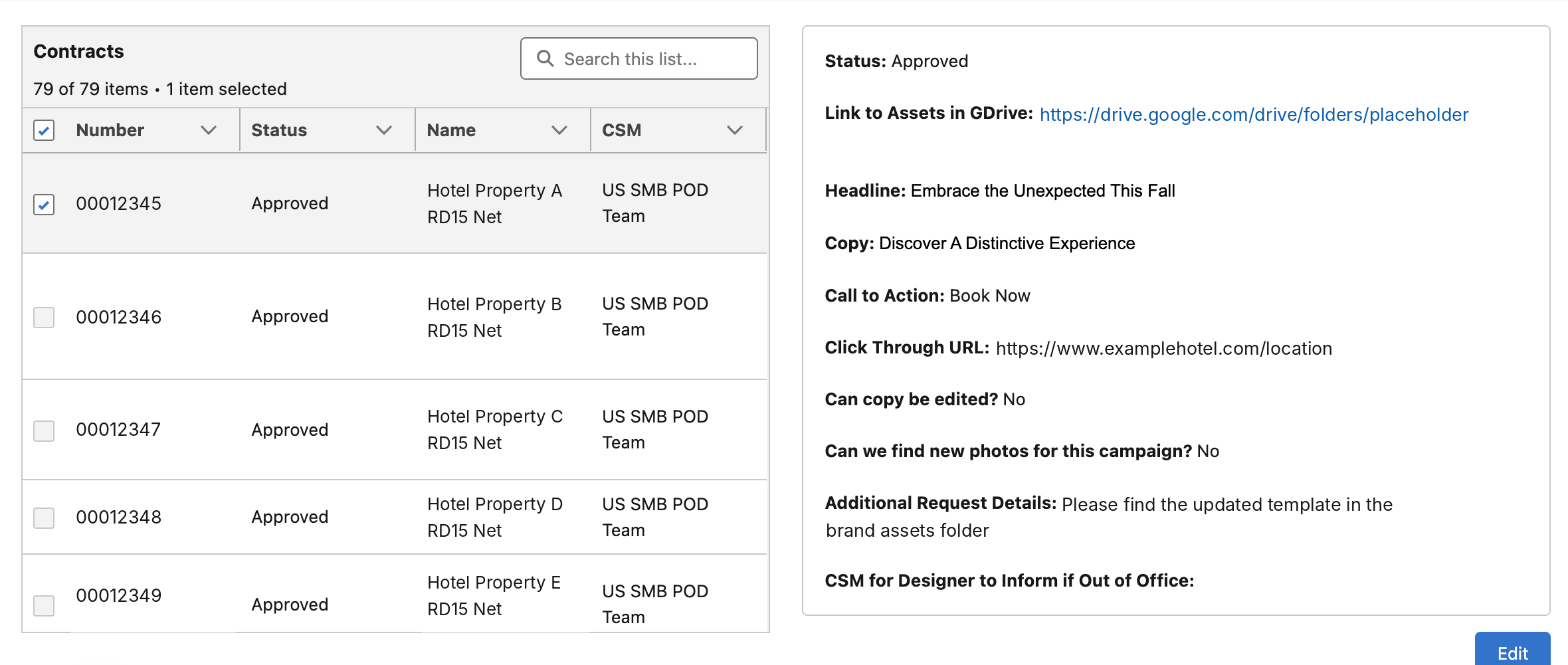
The same kind of campaign now lives on one Salesforce case. In this example, all 79 property contracts sit on a single case, each with its own approval status, alongside the shared creative details.
A single Salesforce case with every property contract attached and its own approval status
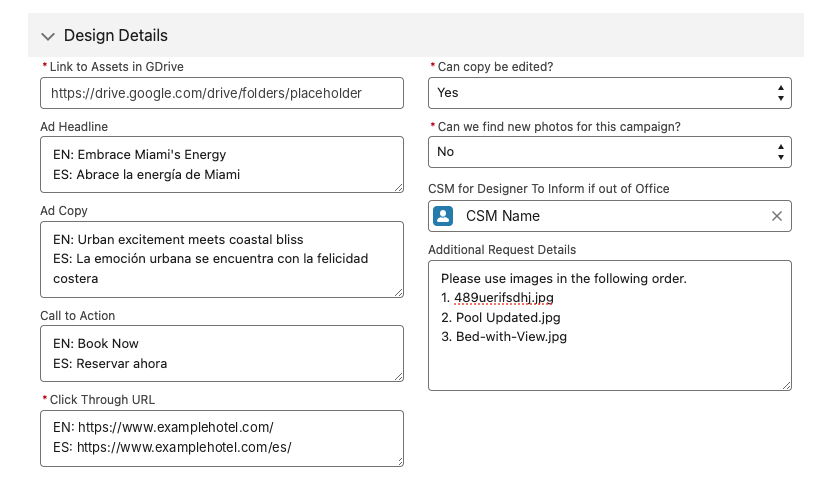
Design Details section of the new creative request form
The updated intake form now includes required fields for assets, copy, call to action, and click-through URLs, so designers get a complete brief the first time.
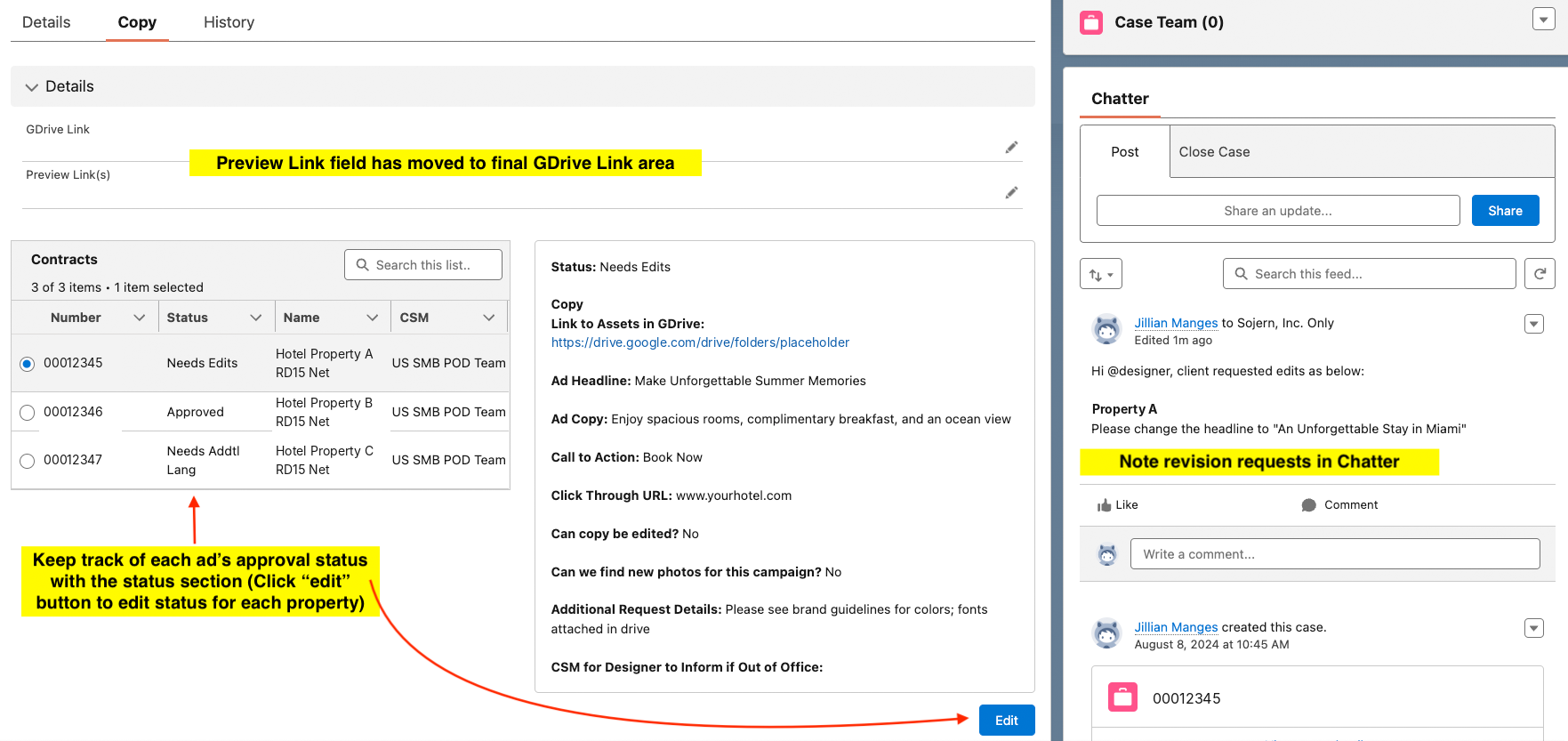
A creative case with multiple contracts, per-property statuses, the preview link field, and revisions in Chatter
One case, many properties. Each contract has its own status, the preview link has a dedicated field, and revision requests stay in Chatter. Annotations are from the CSM training guide. Client details are replaced with placeholders.

05

Results

30 min

saved per bulk campaign, with one case for the whole group instead of one per property

1

system for every creative request now living entirely in Salesforce

21%

faster campaign launches compared to 2022

6

clear stages from request to delivery, with automatic updates at every handoff

5 hrs

of manual reporting eliminated for the Design team every month

3

training resources created to help CSMs and designers adopt the new process quickly

Launched in December 2023, with full bulk request support following in August 2024. Each release came with updated training and a dedicated Slack channel for questions. Today the workflow supports 8,000+ creative cases a year from 30+ CSMs across 5 regions.